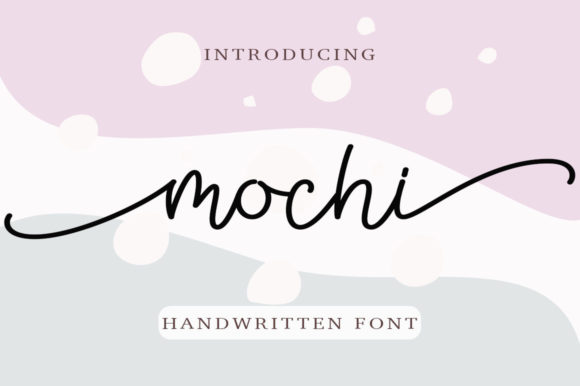
Mochi: A Playful Script Font That Brings Handmade Charm to Life
Designing With Mochi: A Candle Label That Caught My Eye
As I sat down to design a new set of candle labels for my seasonal lavender soy collection, I wanted something that felt soft, elegant, and a little whimsical. I tried a few script fonts, but they either looked too formal or too casual. Then I opened Mochi. The first time I typed “Lavender Fields” in Mochi, I smiled. The letters seemed to sway gently, like they were dancing along the baseline. It wasn’t just readable—it was expressive. I printed a test label and held it up to the light. The curves were smooth, the flow was natural, and the overall feel was handmade in the best way.
What Makes Mochi Special?
Mochi is a lovely script font with a personality that leans toward the playful and charming. It’s not overly ornate, but it carries a sense of movement and warmth that’s perfect for creative projects. Each letter feels like it was written by hand, yet with the polish and precision that makes it suitable for both print and digital use. Whether it’s for a boutique tag, a greeting card, or a digital download preview, Mochi brings a touch of handcrafted authenticity that’s hard to replicate with standard fonts.
Perfect for Short, Sweet, and Stylish Text
Mochi shines brightest when used for short phrases, titles, names, and decorative text. It works beautifully as a display font, making it ideal for product labels, signage, and packaging design. I wouldn’t recommend it for long paragraphs or body copy—its delicate strokes and connected letters are best appreciated in small doses. But when you want something to stand out, like a wedding invitation header or a boutique tag on a handmade soap bar, Mochi delivers with style.
Real-World Uses in My Creative Shop
I’ve used Mochi across a variety of products, and each time it adds a unique visual appeal. Here are a few examples from my own shop:
- Candle Labels: From seasonal scents to gift sets, Mochi gives my labels a soft, approachable look.
- Wedding Invitations: I used it for the couple’s names on a rustic-themed invite, and it complemented the calligraphy-style fonts I paired it with.
- Printable Wall Art: Typing phrases like “Bloom Where You’re Planted” in Mochi instantly gave the design a whimsical, uplifting tone.
- Seasonal Tags: For holiday gift tags and Valentine’s Day cards, Mochi adds a touch of charm without looking too cutesy.
- Digital Downloads: When creating a preview image for a planner printable, Mochi made the title pop in a way that felt both modern and personal.
Readability Matters, Especially for Small Stickers and Labels
One thing I always test when using a script font like Mochi is readability. I printed a few small stickers and checked them under different lighting conditions. At smaller sizes, some letters can blend together, especially if they’re connected. To avoid confusion, I make sure to adjust spacing and use it on clean, high-contrast backgrounds. It also works well when paired with a simple sans serif font for subheadings or additional details, creating a balanced visual hierarchy.
Font Pairing Ideas That Work
Mochi pairs beautifully with a range of other fonts, especially when you’re designing for product packaging or digital printables. Here are a few combinations I’ve used successfully:
- Mochi + Montserrat: A clean, modern sans serif that gives structure to Mochi’s flowing script.
- Mochi + Playfair Display: For a more elegant look, especially in wedding stationery or luxury product branding.
- Mochi + Great Vibes: If you want to layer two script fonts, Mochi holds its own with a slightly bolder companion.
- Mochi + Lato: A soft sans serif that keeps the overall design feeling warm and approachable.
What to Check Before Using Mochi Commercially
Before you use Mochi in your handmade shop or digital product line, it’s important to review the licensing terms. Most premium script fonts, including Mochi, come with a commercial license that allows you to use them in physical products, templates, and digital downloads. But always double-check for the following:
- Included Styles: Does the font come with uppercase, lowercase, numbers, and punctuation?
- Alternate Glyphs: Some fonts include swashes, ligatures, or stylistic alternates that add more design flexibility.
- File Formats: Make sure you have access to OTF, TTF, or WOFF files depending on your design tools and use cases.
- Multilingual Support: If you sell internationally or include translated text, check for accented characters and language support.
How Mochi Elevates Brand Presentation
Using a consistent font like Mochi across product labels, social media graphics, and packaging design helps build brand recognition. Customers start to associate that soft, flowing script with your shop’s personality—whether it’s cozy, elegant, or playful. I’ve noticed that when I use Mochi on my Etsy listing images, it draws attention and gives my product mockups a more polished, professional look. It’s not just a font—it’s part of my brand identity.
Great for Seasonal and Holiday Designs
Mochi has become a go-to for my seasonal product lineups. Whether it’s “Cozy Vibes Only” on a fall mug wrap or “Let It Snow” on a winter-themed sticker sheet, the font adds a festive, personal touch. It also works well for Mother’s Day cards, baby shower tags, and spring-themed planner stickers. The key is to use it in a way that feels authentic to your brand and complements the overall design without overpowering it.
Final Design Tips for Using Mochi
If you’re new to using script fonts like Mochi, start with a simple design and build from there. Here are a few tips I’ve picked up along the way:
- Use it at a larger size for headlines and names to highlight its character.
- Pair it with a minimalist font to create contrast and visual balance.
- Check spacing when using it for product mockups or SVG designs—sometimes letters need a little extra room.
- Use it in color combinations that enhance its soft, flowing style—think muted pastels or warm neutrals.
- Preview your designs on different devices, especially if you’re using Mochi in digital printables or web graphics.